
ArcheAgePlayerBots
Testing Server Coming Soon
An ArcheAge world full of life.
Our goal is a world populated by high-quality, player-like bots. Help us bring ArcheAge to life through parties, dungeons, PvP, trading, and travel.
A world
full of life.
Our goal is to populate ArcheAge with high-quality, player-like bots so you can enjoy the experience of a living, populated world.
Built as a mod for AAEmu, the ArcheAge server emulator, PlayerBots aims to simulate life across the world: bots forming parties, running dungeons, taking part in PvP, trading, and travelling between places. The long-term goal is a population with its own activity, progression, and reasons to be out in the world.
Today, the foundations include server-controlled characters, party commands, native ArcheAge combat, and saved progress. Development focuses on ArcheAge 1.2, with fresh-character creation and automatic starter questing still experimental. Dungeons, broader PvP, and trading are part of the goal we’re working toward.
You can help the project grow before the testing server opens. Contribute world data, record routes, improve the code or documentation, or bring another skill. Contact Over1ander on Discord to find out where you can help.
Help shape the project.
World knowledge, recorded routes, code, and clear documentation all help move PlayerBots forward. Choose something you enjoy and contact Over1ander to get started.
QuestsTake the next adventure Starter quests, side stories & the road aheadFor questers
Help document ArcheAge 1.2 quests: objectives, interactions, and the paths between them. Contact Over1ander to find out which quest data would be most useful before starting a recording.
- While you play
- Note the quest name, NPC or object involved, and what each step requires. A clear description gives us somewhere to start.
- If you catch it
- A screenshot or short clip can show what happened far better than a long report.
ExploreTake the scenic route Towns, hidden roads, bridges & cavesFor explorers
Prefer wandering to questing? Contribute recorded paths and landmark notes from ArcheAge 1.2. Familiar roads and places you’ve never visited are both worth mapping.
- While you play
- Note bridges, different floors, difficult crossings, and gaps in the Atlas. Include the zone and nearest landmark.
- Want to go further?
- Have your own AAEmu 1.2 setup? Download the standalone Route Recorder and collect paths and landmark notes on your own time.
BuildBring your skills Code, documentation & project toolsFor makers
Help with development, documentation, or tools that make contributing easier. Message Over1ander with your interests and experience to find a useful place to start.
- Introduce yourself
- Tell us what you enjoy working on and how much time you have. Small, focused contributions are welcome.
- Find a starting point
- Browse the source and documentation on GitHub, then contact Over1ander to coordinate a contribution.
FeedbackEvery session can teach us something Good moments, strange behavior & things that breakFor everyone
You don’t need a technical report to help. Tell us what you expected, what actually happened, and where you were. The things that worked are useful to hear about too.
- Keep it simple
- Message Over1ander on Discord. Include a quest or landmark name if you know it, and attach a screenshot or clip if you have one.
- Optional recordings
- If we arrange a recording session, we’ll explain the setup and what to share. Check images and notes for anything private before sending them.
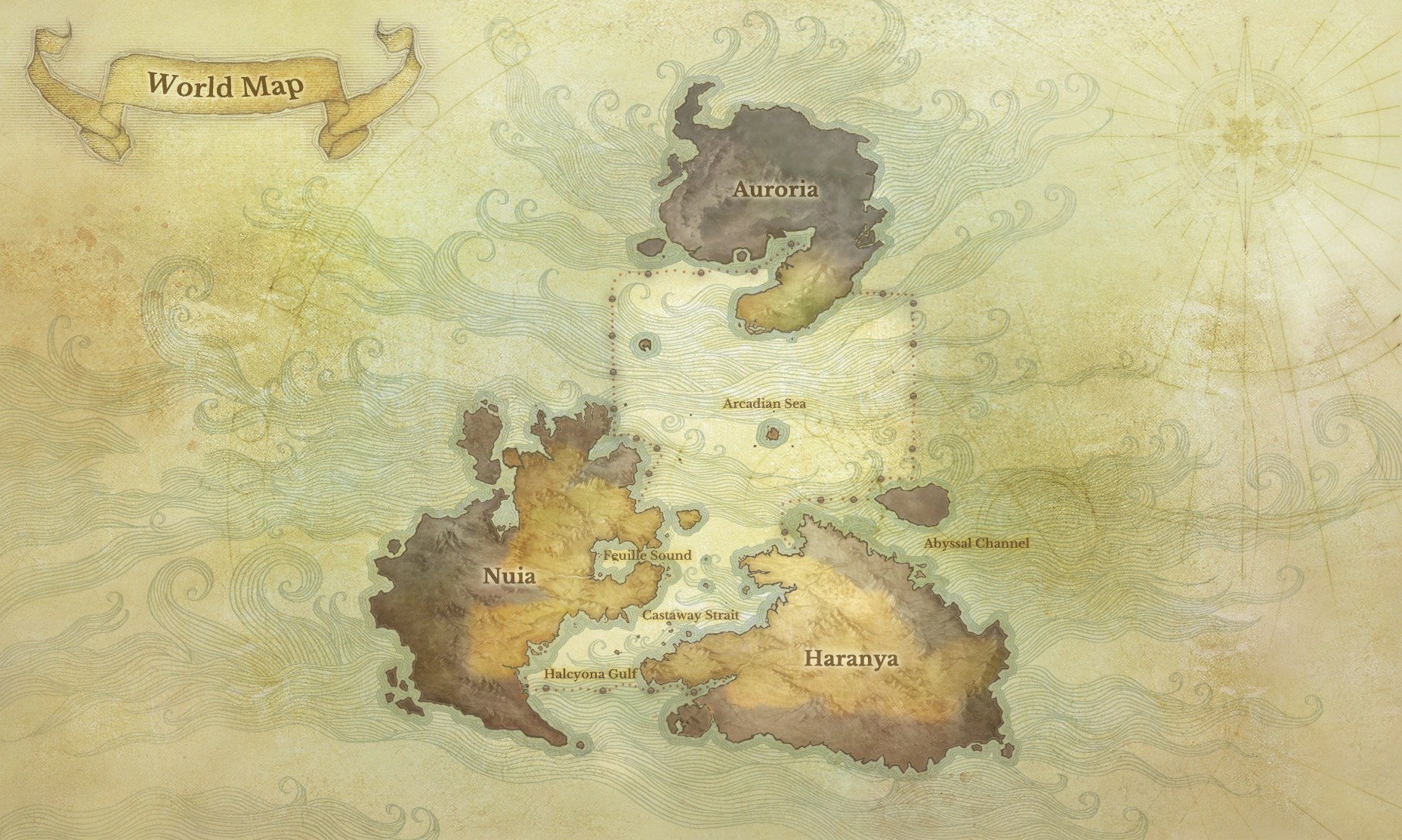
Explore the world
we’re mapping.
Browse the roads and recorded paths already collected across Nuia and Haranya. Switch between the original 2D maps and rotatable 3D terrain, and find places where you could help fill in the gaps.
24 zones · 100 distinct recordings
Open the Route AtlasRecorded routes describe the trips people took. Map-derived roads and joins still need testing; terrain does not show every bridge, building, or cave floor.
Core contributors
The people helping bring PlayerBots to life.
-
Azu
Early Originator & World Data
Discord · azuswe
Want to help
build PlayerBots?
Contact Over1ander on Discord to find out how to get involved. We’re looking for world data, recorded routes, development help, documentation, and other contributions. Tell us what interests you. We’ll help you find a place to start.
This link opens the AAEmu community Discord. Find Over1ander there and send a message about contributing to PlayerBots.
Help map the world today
Already running AAEmu 1.2? Record routes and landmarks at your own pace. Get the Data Tools and simple setup guide →
Testing Server Coming Soon
The testing server is not open yet, but contributions are welcome now. Contact Over1ander to discuss how you can help.
Contact Over1ander
Send a message on Discord with your interests, skills, or the kind of data you could contribute.
Find a way to help
We’ll discuss what’s needed and agree on a useful contribution, from route recordings to code or documentation.
Share your contribution
We’ll explain any setup and how to share your work. You don’t need to wait for the testing server to open.
Getting involved
Can I contribute before the testing server opens?
Yes. Contact Over1ander on Discord about world data, route recordings, development, documentation, or another way you’d like to help. The testing server is not open yet and has no announced launch date.
Do I have to quest or level a character?
No. Exploration, route mapping, documentation, and development are useful too. Tell Over1ander what you enjoy so we can find a contribution that suits you.
Which version should data come from?
We’re focusing on ArcheAge 1.2 r208022. Check with Over1ander before collecting data from another version, since quests and world details may differ.
Do I need my own server or technical experience?
It depends on the contribution. The Route Recorder requires an AAEmu 1.2 setup, while documentation and other project help may not. Contact Over1ander first and we’ll explain what’s needed.
Where should I send data or other work?
Message Over1ander on Discord to arrange how to share it and confirm what would be useful. For recordings, include the game version, zone, and a short description of what you collected.